Ford Maverick Overland Bed Rack | XTR3 Custom Height

Regular price $2,209.99 USD

/* eslint-disable max-len */ /** * Dependencies: * - Custom select component * - Fetch cache (theme.fetchCache) * - Quickbuy content transformer (theme.quickBuy.convertToQuickBuyContent) * * Required translation strings: * - noStock * - noVariant */ if (!customElements.get('variant-picker')) { class VariantPicker extends HTMLElement { constructor() { super(); this.quickBuyContainer = this.closest('.js-quickbuy'); this.featuredProductContainer = this.closest('.cc-featured-product'); this.section = this.quickBuyContainer || this.featuredProductContainer || this.closest('.shopify-section'); this.optionSelectors = this.querySelectorAll( '.option-selector:not(.option-selector--custom):not(.option-selector--composite-generated)' ); this.productAvailable = this.classList.contains('variant-picker--product-available'); this.variant = this.getVariantData(); this.compositeSelectionState = {}; if (this.dataset.compositeSelectionState) { try { this.compositeSelectionState = JSON.parse(this.dataset.compositeSelectionState) || {}; } catch (error) { this.compositeSelectionState = {}; } } // Track interaction independently for each composite option. this.compositeInteractionState = {}; if (this.dataset.compositeInteractionState) { try { this.compositeInteractionState = JSON.parse(this.dataset.compositeInteractionState) || {}; } catch (error) { this.compositeInteractionState = {}; } } this.compositeUserInteracted = Object.values(this.compositeInteractionState).some(Boolean); // A saved compositeSelectionState means Shopify has just replaced the // section. initCompositeSelectors() must not overwrite that state with // the blank controls it creates before syncCompositeSelectorsFromNative() // has a chance to restore them. this.restoringCompositeState = Object.keys(this.compositeSelectionState).length > 0; this.variantRequestId = 0; // High-variant support is only used when Shopify's Liquid // product.variants collection is over its 250-variant limit. this.highVariantDataLoaded = false; this.highVariantDataLoading = false; this.addListeners(); this.updateVariantContent(); if (!this.quickBuyContainer && !this.featuredProductContainer) { setTimeout(this.applySearchParams.bind(this), 0); } this.setAttribute('loaded', ''); } addListeners() { // The dynamic variant content used by the theme can be replaced without // constructing a new , so refresh this NodeList here. this.optionSelectors = this.querySelectorAll( '.option-selector:not(.option-selector--custom):not(.option-selector--composite-generated)' ); this.initCompositeSelectors(); // Do not change the normal v13 path for products with <=250 variants. // Larger products are augmented after the existing controls are built. this.loadHighVariantDataIfNeeded(); // Composite selectors are an alternate UI and must start unselected on // the initial page load. When Shopify replaces the picker after a real // composite selection, the selection state is carried in data attributes; // in that case we MUST NOT clear the newly inserted native selector. if (!this.compositeInitialised) { this.compositeInitialised = true; if (!Object.values(this.compositeInteractionState).some(Boolean)) { this.clearAllCompositeSelections(); } } this.boundHandleVariantChange = this.handleVariantChange.bind(this); this.addEventListener('change', this.boundHandleVariantChange); this.boundHandleLabelMouseEnter = this.handleLabelMouseEnter.bind(this); this.querySelectorAll('.opt-label, .custom-select__option').forEach((el) => { el.addEventListener('mouseenter', this.boundHandleLabelMouseEnter); el.addEventListener('touchstart', this.boundHandleLabelMouseEnter, { passive: true, once: true }); el.addEventListener('mouseleave', VariantPicker.handleLabelMouseLeave); }); } /** * Builds the additional human-friendly dropdowns for composite Shopify * option values. The real Shopify selector remains in the DOM but hidden. * * A composite option looks like: * Name: Make--Model--Bed Length * Value: Chevy--Silverado 1500--6' * * The generated controls are only a UI layer. When all component controls * are selected, the exact original Shopify value is selected on the * hidden custom-select, allowing the rest of the theme to work normally. */ /** * Augment the existing v13 variant matrix for products with more than * Shopify's 250-variant Liquid limit. * * The original Liquid JSON remains the initial data source. This method * only runs for >250 variants, fetches the complete variant connection, * appends missing variants, and then re-runs the existing v13 filtering. */ async loadHighVariantDataIfNeeded() { const variantCount = Number(this.dataset.variantCount || 0); if (!Number.isFinite(variantCount) || variantCount <= 250) return; if (this.highVariantDataLoaded || this.highVariantDataLoading) return; const handle = this.dataset.productHandle || ''; if (!handle) { console.warn('High-variant composite picker: product handle is missing.'); return; } this.highVariantDataLoading = true; try { const query = ` query ProductVariants($handle: String!, $cursor: String) { productByHandle(handle: $handle) { variants(first: 250, after: $cursor) { nodes { id availableForSale selectedOptions { name value } } pageInfo { hasNextPage endCursor } } } } `; const allVariants = []; let cursor = null; let hasNextPage = true; while (hasNextPage) { const response = await fetch('/api/2026-07/graphql.json', { method: 'POST', headers: { 'Content-Type': 'application/json', 'Accept': 'application/json' }, body: JSON.stringify({ query, variables: { handle, cursor } }) }); if (!response.ok) { throw new Error(`Storefront API returned HTTP ${response.status}`); } const payload = await response.json(); if (payload.errors?.length) { throw new Error(payload.errors.map((error) => error.message).join('; ')); } const connection = payload.data?.productByHandle?.variants; if (!connection) { throw new Error('Storefront API did not return product variants.'); } allVariants.push(...(connection.nodes || [])); hasNextPage = Boolean(connection.pageInfo?.hasNextPage); cursor = connection.pageInfo?.endCursor || null; if (hasNextPage && !cursor) { throw new Error('Storefront API returned another page without a cursor.'); } } if (!allVariants.length) { throw new Error('Storefront API returned no variants.'); } const completeVariants = allVariants.map((variant) => ({ id: String(variant.id || '').split('/').pop(), available: Boolean(variant.availableForSale), options: (variant.selectedOptions || []).map((option) => option.value) })); const existingIds = new Set( (this.compositeVariants || []).map((variant) => String(variant.id)) ); const additionalVariants = completeVariants.filter( (variant) => variant.id && !existingIds.has(variant.id) ); this.compositeVariants = [ ...(this.compositeVariants || []), ...additionalVariants ]; this.highVariantDataLoaded = true; // Reuse the existing v13 filtering/selection logic. this.querySelectorAll( '.option-selector[data-composite-option="true"]' ).forEach((nativeSelector) => { this.updateCompositeSelectorsFor(nativeSelector); }); this.autoSelectForcedCompositeOptions(); } catch (error) { // Keep the original v13 first-250 behavior if the API is unavailable. console.warn( 'Unable to load variants beyond Shopify Liquid’s 250-variant limit for the composite picker.', error ); } finally { this.highVariantDataLoading = false; } } initCompositeSelectors() { const variantDataElement = this.querySelector('[data-composite-variant-data]'); if (!variantDataElement) return; let variants; try { variants = JSON.parse(variantDataElement.textContent); } catch (error) { console.warn('Unable to parse composite variant data.', error); return; } this.compositeVariants = Array.isArray(variants) ? variants : []; // Style invalid composite choices without affecting the theme's native // custom-select styling. The invalid choices remain in the list so the // customer can see the complete option set. if (!this.querySelector('style[data-composite-option-styles]')) { const style = document.createElement('style'); style.dataset.compositeOptionStyles = 'true'; style.textContent = ` .composite-option-select option.composite-option-invalid { color: #b85c5c; background-color: #fdeaea; } `; this.appendChild(style); } this.querySelectorAll('.option-selector[data-composite-option="true"]').forEach((nativeSelector) => { if (nativeSelector.dataset.compositeInitialized === 'true') return; const delimiter = nativeSelector.dataset.compositeDelimiter || '--'; const nativeOptionName = nativeSelector.dataset.option || ''; const firstNativeValue = nativeSelector.querySelector('.js-option[data-value]')?.dataset.value || ''; if (!firstNativeValue) return; // The Liquid template uses -- in values even when the abbreviated // Year-Make-Model name uses single hyphens. const partNames = nativeOptionName.includes('--') ? nativeOptionName.split('--') : nativeOptionName.split('-'); const nativeOptions = Array.from( nativeSelector.querySelectorAll('.js-option[data-value]:not([data-value=""])') ).map((option) => ({ value: option.dataset.value, valueId: option.dataset.valueId, parts: option.dataset.value.split('--') })); if (!partNames.length || nativeOptions.some((option) => option.parts.length !== partNames.length)) { return; } const compositeContainer = document.createElement('div'); compositeContainer.className = 'composite-option-pickers'; compositeContainer.dataset.compositeFor = nativeSelector.dataset.index; partNames.forEach((partName, partIndex) => { const wrapper = document.createElement('div'); wrapper.className = 'option-selector option-selector--composite-generated'; wrapper.dataset.compositeGenerated = 'true'; wrapper.dataset.compositeIndex = nativeSelector.dataset.index; wrapper.dataset.compositePartIndex = partIndex; const label = document.createElement('label'); label.className = 'label'; label.textContent = partName; const select = document.createElement('select'); select.className = 'select composite-option-select custom-select__btn input items-center'; select.dataset.compositeIndex = nativeSelector.dataset.index; select.dataset.compositePartIndex = partIndex; select.setAttribute('aria-label', partName); const placeholder = document.createElement('option'); placeholder.value = ''; placeholder.textContent = this.dataset.placeholderText || 'Please select'; select.appendChild(placeholder); wrapper.appendChild(label); wrapper.appendChild(select); compositeContainer.appendChild(wrapper); }); nativeSelector.after(compositeContainer); nativeSelector.classList.add('option-selector--composite-native'); nativeSelector.setAttribute('aria-hidden', 'true'); nativeSelector.style.display = 'none'; nativeSelector.dataset.compositeInitialized = 'true'; nativeSelector.querySelectorAll('.js-option').forEach((option) => { option.dataset.compositeOriginalValue = option.dataset.value || ''; }); this.updateCompositeSelectorsFor(nativeSelector); }); } /** * Reset every generated composite selector and its hidden Shopify selector. * This is deliberately used only during initial setup; after that, * selections are controlled by the customer. */ clearAllCompositeSelections() { this.querySelectorAll('.option-selector[data-composite-option="true"]').forEach((nativeSelector) => { const container = this.querySelector( `.composite-option-pickers[data-composite-for="${CSS.escape(nativeSelector.dataset.index)}"]` ); if (container) { container.querySelectorAll('.composite-option-select').forEach((select) => { select.value = ''; }); } this.compositeSelectionState[nativeSelector.dataset.index] = []; this.clearCompositeNativeSelection(nativeSelector); this.updateCompositeSelectorsFor(nativeSelector); }); } /** * Returns the component parts for a Shopify option value. */ getCompositeParts(nativeValue, delimiter) { // Shopify values always use the double-hyphen delimiter. The delimiter // argument is retained so the generated control can document which // name syntax activated the feature. return String(nativeValue || '').split('--'); } /** * Tests whether a generated component selection matches a native value. * Year is special: selecting 2005 matches a native value such as * "2000-2008". */ compositePartMatches(partName, selectedValue, nativePart) { if (!selectedValue) return true; if (partName.trim().toLowerCase() === 'year') { const rangeMatch = String(nativePart).trim().match(/^(\d{4})\s*-\s*(\d{4})$/); if (rangeMatch) { const year = Number(selectedValue); const start = Number(rangeMatch[1]); const end = Number(rangeMatch[2]); return Number.isInteger(year) && year >= Math.min(start, end) && year <= Math.max(start, end); } } return nativePart === selectedValue; } /** * Year dropdowns may temporarily display the exact Shopify range that was * selected by the variant refresh. This is presentation-only state; it is * not a real generated year selection. */ isCompositeYearRangePlaceholder(value) { return typeof value === 'string' && value.startsWith('__native_year_range__:'); } getCompositeYearRangeFromPlaceholder(value) { if (!this.isCompositeYearRangePlaceholder(value)) return ''; return value.slice('__native_year_range__:'.length); } /** * Gets the currently selected generated values for one composite option. */ getCompositeSelection(nativeSelector) { const container = this.querySelector( `.composite-option-pickers[data-composite-for="${CSS.escape(nativeSelector.dataset.index)}"]` ); if (!container) return []; return Array.from(container.querySelectorAll('.composite-option-select')).map((select) => select.value || null); } /** * Determines whether a Shopify variant is compatible with the selections * currently made in the generated controls. */ variantMatchesCompositeSelections(variant, selections, compositeSelectorIndex) { const nativeOptionIndex = Number(compositeSelectorIndex) - 1; const nativeValue = variant?.options?.[nativeOptionIndex]; if (nativeValue == null) return false; const nativeParts = this.getCompositeParts(nativeValue, ''); const container = this.querySelector( `.composite-option-pickers[data-composite-for="${CSS.escape(String(compositeSelectorIndex))}"]` ); const selects = container ? Array.from(container.querySelectorAll('.composite-option-select')) : []; return selections.every((selectedValue, partIndex) => { if (!selectedValue) return true; const partName = selects[partIndex]?.getAttribute('aria-label') || ''; return this.compositePartMatches(partName, selectedValue, nativeParts[partIndex]); }); } /** * Updates every generated dropdown so it contains only values that can * still lead to a real Shopify variant. */ updateCompositeSelectorsFor(nativeSelector) { const container = this.querySelector( `.composite-option-pickers[data-composite-for="${CSS.escape(nativeSelector.dataset.index)}"]` ); if (!container || !this.compositeVariants) return; const selects = Array.from(container.querySelectorAll('.composite-option-select')); const nativeOptions = Array.from( nativeSelector.querySelectorAll('.js-option[data-value]:not([data-value=""])') ).map((option) => ({ value: option.dataset.value, parts: this.getCompositeParts(option.dataset.value, nativeSelector.dataset.compositeDelimiter) })); const currentSelections = selects.map((select) => { const value = select.value || null; // A native year-range placeholder is informational only. It must not // constrain the sparse-tree filtering as though it were a real year. return this.isCompositeYearRangePlaceholder(value) ? null : value; }); selects.forEach((select, partIndex) => { const selectedOtherParts = currentSelections.slice(); selectedOtherParts[partIndex] = null; const nativeOptionIndex = Number(nativeSelector.dataset.index) - 1; const otherNativeSelections = Array.from(this.optionSelectors).map((selector, selectorIndex) => { if (selector === nativeSelector) return null; // Ignore hidden Shopify selections for other composite groups. Their // native values may be Shopify's automatic first variant. The // generated controls below are the authoritative composite state. if (selector.dataset.compositeOption === 'true') return null; if (selector.dataset.selectorType === 'dropdown') { const selected = selector.querySelector('.custom-select__option[aria-selected="true"]'); return selected && selected.dataset.value !== '' ? selected.dataset.value : null; } const selected = selector.querySelector('input:checked'); return selected ? selected.value : null; }); const possibleNativeValues = nativeOptions.filter((nativeOption) => { const hasVariant = this.compositeVariants.some((variant) => { const variantNativeValue = variant?.options?.[nativeOptionIndex]; if (variantNativeValue !== nativeOption.value) return false; // Respect any ordinary Shopify option selections. const otherNativeOptionsMatch = otherNativeSelections.every((selectedValue, selectorIndex) => { if (!selectedValue) return true; return variant?.options?.[selectorIndex] === selectedValue; }); if (!otherNativeOptionsMatch) return false; // Respect generated selections from every composite option, // including partially selected composites. This is what makes // the sparse tree work across multiple Shopify options. return Array.from( this.querySelectorAll('.option-selector[data-composite-option="true"]') ).every((otherNativeSelector) => { const otherIndex = Number(otherNativeSelector.dataset.index) - 1; const otherContainer = this.querySelector( `.composite-option-pickers[data-composite-for="${CSS.escape(otherNativeSelector.dataset.index)}"]` ); if (!otherContainer) return true; const otherSelects = Array.from( otherContainer.querySelectorAll('.composite-option-select') ); const selectionsForOtherComposite = otherNativeSelector === nativeSelector ? selectedOtherParts : this.getCompositeSelection(otherNativeSelector); const otherNativeValue = variant?.options?.[otherIndex]; if (otherNativeValue == null) return false; const otherParts = this.getCompositeParts( otherNativeValue, otherNativeSelector.dataset.compositeDelimiter ); return selectionsForOtherComposite.every((selectedValue, componentIndex) => { if (!selectedValue) return true; const componentName = otherSelects[componentIndex]?.getAttribute('aria-label') || ''; return this.compositePartMatches( componentName, selectedValue, otherParts[componentIndex] ); }); }); }); return hasVariant; }); // Build two complete option sets: // 1. valid values, based on the current selections // 2. all values that exist in the product, regardless of the current selections // // Valid values are displayed first. Invalid values remain visible in // the dropdown so the customer can see the complete option tree. const allValues = new Map(); const validValues = new Map(); const partName = select.getAttribute('aria-label') || ''; const isYear = partName.trim().toLowerCase() === 'year'; const addPartValue = (map, part) => { if (part == null || part === '') return; if (isYear) { const rangeMatch = String(part).trim().match(/^(\d{4})\s*-\s*(\d{4})$/); if (rangeMatch) { const start = Number(rangeMatch[1]); const end = Number(rangeMatch[2]); for (let year = Math.max(start, end); year >= Math.min(start, end); year -= 1) { map.set(String(year), String(year)); } return; } } map.set(part, part); }; nativeOptions.forEach((nativeOption) => { addPartValue(allValues, nativeOption.parts[partIndex]); }); possibleNativeValues.forEach((nativeOption) => { addPartValue(validValues, nativeOption.parts[partIndex]); }); const previousValue = select.value; const previousYearRange = this.isCompositeYearRangePlaceholder(previousValue) ? this.getCompositeYearRangeFromPlaceholder(previousValue) : ''; select.innerHTML = ''; const placeholder = document.createElement('option'); placeholder.value = ''; placeholder.textContent = this.dataset.placeholderText || 'Please select'; select.appendChild(placeholder); const validSortedValues = Array.from(validValues.entries()); const invalidSortedValues = Array.from(allValues.entries()) .filter(([value]) => !validValues.has(value)); const sortValues = (a, b) => { if (isYear) return Number(b[0]) - Number(a[0]); return a[1].localeCompare(b[1], undefined, { numeric: true, sensitivity: 'base' }); }; validSortedValues.sort(sortValues); invalidSortedValues.sort(sortValues); const appendOption = ([value, label], invalid) => { const option = document.createElement('option'); option.value = value; option.textContent = label; if (invalid) { option.classList.add('composite-option-invalid'); option.dataset.compositeInvalid = 'true'; // Inline styling provides a fallback for browsers that do not // apply stylesheet rules to native

Xtrusion Overland  |  SKU: X01-XTR3-CUSTOM-MAVE-A-WDW-10H-48L

Lead Times

Current Lead Times

Please Note That All Lead Times Are Estimations*

  • XO.SKLTN  | 10-12 weeks
  • XTR1, XTR3 & XBRS Bed Racks | 4-7 weeks
  • Extrusion Sub-Structures | 3-4 weeks
  • Xtrusion Branded Accessories | 1-2 weeks

Our posted lead times are only estimations and rely on various factors, many times outside of our control. Historic challenging times within our industry have caused ripples in the supply chain world that have repercussions even on the smallest of components at times. As you would imagine, many companies in our industry are experiencing the same. 

Our bed racks are super cool, with the ability to be customized. But this causes a series of challenges due to the thousands of possible combinations regarding compatibility, availability, etc. However, we are constantly aiming at improving our processes, hiring and training our people to achieve a reliable fulfillment process. 

If you have additional questions about our lead times, please check our current estimations and reach out to our team if you need additional information. We thank you for your continued support and patience as we improve our processes.

While we would do our best to accommodate a specific need, please do not plan any trips or outings based on the estimated lead times. 


THIRD PARTY PRODUCTS

Xtrusion Overland started supplying various brands that go hand in hand with our own products, to provide a complete service and help us grow. This includes products that are drop shipped. Please be advised that availability and lead times of those product are solely impacted by the third-party vendor's schedule. Many products are sold under an open inventory method, as the technology to sync inventories is limited, therefore please reach out if a specific product is needed by a specific date for us to double check with the supplier for you!

Any potential delay that occurs in the sourcing, processing, or drop shipment at the third party level will be communicated to the best of our ability to the customer.


ESTIMATED DATE  |  LEAD TIMES

The estimated lead time provided when you placed your order is JUST AN ESTIMATE. It is not a guarantee that the product will be shipped on that date. The estimated lead time gives you some sense of what the current times to source, cut, pack and ship takes. Many times the lead time can be shorter, but likewise it can extend, depending on factors such as previous demand and current supply. We manufacture many components in house, but extenuating circumstances such as down time for maintenance or unscheduled downtimes for repairs might impact dates as well as delays related to our sourced components. There is a constant flow of parts and shipments, and sometimes the visibility becomes a challenge to pinpoint exactly when your product will ship.

Feel free to check on your order at any time. Be aware that our customer service team may not be able to give you an exact date for completion but rest assured we are tracking your order and it will be built in the order that it was received. 

Xtrusion Overland also reserves the right to cancel items from an order, offer an alternative substitution or issue refund accordingly when product is delayed at an unacceptable time frame or at the request of the customer.

Rack Angle Guide


Overland Rack Angle Compatibility

One Angle.
Every Build.

XTR bed racks use three rack angles — 9°, 13°, and 20° — each matched to specific vehicle setups and accessory families. Find the right angle for your build so every rail, crossbar, and mounting kit lines up perfectly.

Engineered quality

CNC billet strength

We didn't just join the strong extrusions with some sheet metal corner brackets — we put the aluminum where it makes a difference. Every angle variant uses the same 6061-T6 Aerospace grade billet, machined to precision to join all components with exact angular alignment.

  • All three angles share the same billet standard
  • 9°, 13°, and 20° brackets machined to exact specs
  • No sheet metal corners — pure aerospace aluminum
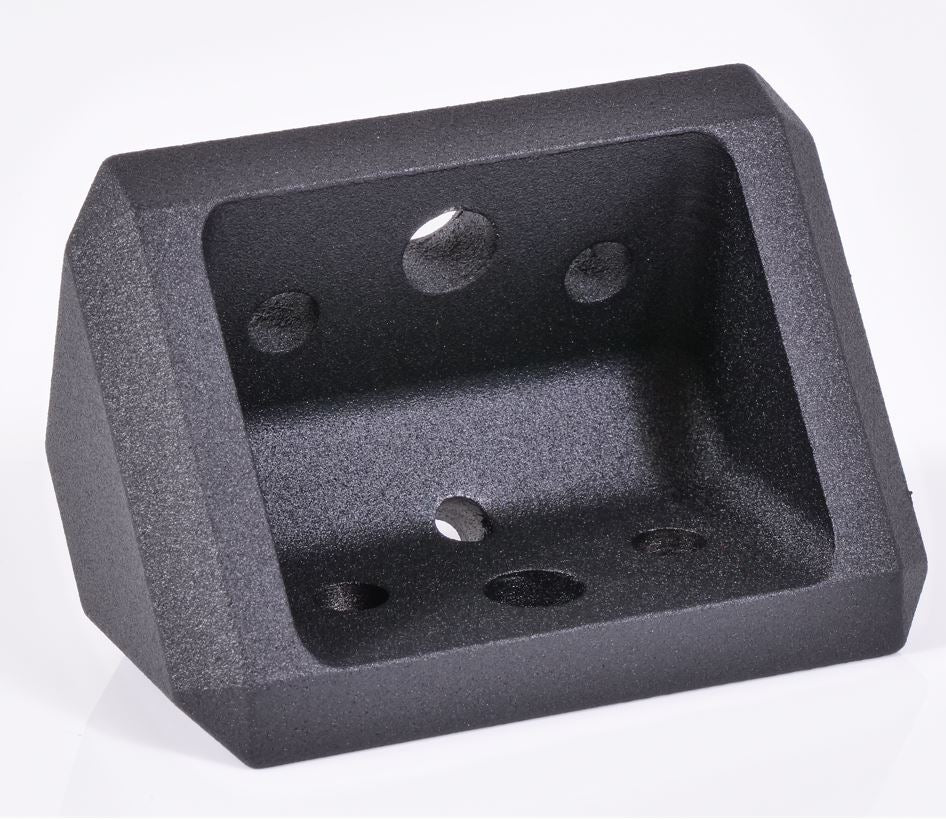
CNC billet corner brackets for XTR bed racks — available in 9°, 13°, and 20° angles
Quick Reference

Angle Compatibility

Rack Angle Product Line Compatible Accessories
Gladiator Series All Gladiator bedracks, Gladiator mounting kits, Gladiator-specific crossbars, including Softopper versions on Gladiator.
13° Soft Topper Series Soft Topper bed racks for all truck models (except Gladiator). 
20° Universal / Crossbars All XTR1, XTR3, XBRS Bed Racks, universal mounting rails, standard rack accessories (except Gladiator or Softopper)
9-degree Gladiator rail crossbar — XTR Gladiator series rack angle
9° angle

Gladiator Series

The 9° angle is dedicated to the Gladiator product line. This angle was engineered specifically for Gladiator rails and their mounting geometry, ensuring a flush, secure connection between your rails and any Xtrusion add-on accessories. This includes Softopper Gladiator Builds

Xo Skeleton Note: The XO.SKLTN Uses a complete different system not to be confused with Gladiator XTR 9 Degree components.

13-degree Soft Topper rail crossbar — XTR Soft Topper series rack angle
13° angle

Soft Topper Series

The 13° angle serves Soft Topper products. This intermediate angle provides the right compromise between load clearance and low profile when mounting accessories to Soft Topper rails and their compatible hardware.

Crossbars: XTR1 and XTR3 use 13° when mounted on Soft Topper setups.

20-degree universal rack crossbar — XTR universal and crossbar series
20° angle

Universal / Crossbars

The 20° angle is the default for all other Xtrusion products — universal mounting rails, standard crossbars, and general overland rack accessories. This is the most common angle in the industry and works with the widest range of roof rack and truck bed rack systems.

Exception: XBRS Crossbars use 9 Degree components, in case you decide to upgrade to full rack, so it remains compatible on joints.

Quick Reference

Xo Skeleton — Angle Breakdown

The Xo Skeleton uses two angles Gladiator Specific or Universal. However, some accessories might be compatible with both, because the top rail consolidates both angles into one. Crossbar mounts or awning mounts are compatible with both versions.

9° Angle

XOSKLTN Gladiator
Xo Skeleton Gladiator 9-degree angle
  • Gladiator rail mounts
  • Gladiator-specific hardware
  • Gladiator crossbar slots

13° Angle

XOSKLTN
Xo Skeleton Soft Topper 13-degree angle
  • Soft Topper rail mounts
  • Soft Topper mounting kits
  • Soft Topper crossbar slots

Note: The Xo Skeleton never uses the 20° angle.

How To Choose

The Right Rack Angle,
Explained

Every XTR accessory — crossbars, mounting brackets, add-on hardware — is cut for one specific angle. The right angle depends on your primary rail system or vehicle setup. Choosing the matching angle ensures every component in your build aligns correctly and carries load as designed.

  • Identify your rail system. Gladiator = 9°, Soft Topper = 13°, universal = 20°.
  • Check your crossbar type. XTR1/XTR3 come in all three — order the one matching your rails.
  • Stick to one angle per build. Mixing angles creates misalignment and stress points.
What determines the rack angle I need? +
Your rack angle is determined by your primary rail system or vehicle setup. Gladiator rails use 9°, Soft Topper setups use 13°, and universal or standard rack accessories use 20°. Choosing the matching angle ensures every accessory — crossbars, mounting brackets, and add-ons — aligns correctly.
Can I use a 20° crossbar with a Gladiator rail? +
No. Gladiator rails are engineered for 9° accessories. Using a 20° crossbar on a Gladiator rail will result in misalignment and improper load transfer. Always match your crossbar angle to your rail system.
Do Soft Toppers and Gladiator rails use the same angle? +
No. Soft Toppers use a 13° angle while Gladiator rails use a 9° angle. These angles are not interchangeable. If you're building with both types, you'll need separate angle-specific accessory sets.
Are XTR1 and XTR3 crossbars angle-specific? +
XTR1 and XTR3 crossbars come in three angle variants — 9°, 13°, and 20° — to match each rack system. The 20° variant is the default and works with universal racks. The 13° variant is used when paired with Soft Topper setups. Order the angle that matches your primary rail system.
Why do overland racks use different angles? +
Different rack angles exist to accommodate varying vehicle roof geometries, rail profiles, and load requirements. The 9° angle works well with Gladiator-style tubular rails. The 13° angle provides a middle ground for Soft Topper mounting systems. The 20° angle is the industry standard for universal applications and offers maximum load clearance.

Description

Dial in your Ford Maverick to the exact height your mission demands. This is the fully custom XTR3 Bed Rack — choose your rack height in 1" increments so it fits your rooftop tent, tonneau cover, cab line, or garage clearance perfectly. Whether you're building an overland rig for backcountry camping, a utility hauler for ladders, lumber, and conduit, or a commercial work truck that earns its keep on the jobsite, the XTR3 adapts to exactly how you use your bed.

Want a quick-start setup instead? Our preconfigured XTR3 Stages Bed Rack comes in our most popular ready-to-go heights — low, mid, full, and soft-top. Shop the Stages rack →

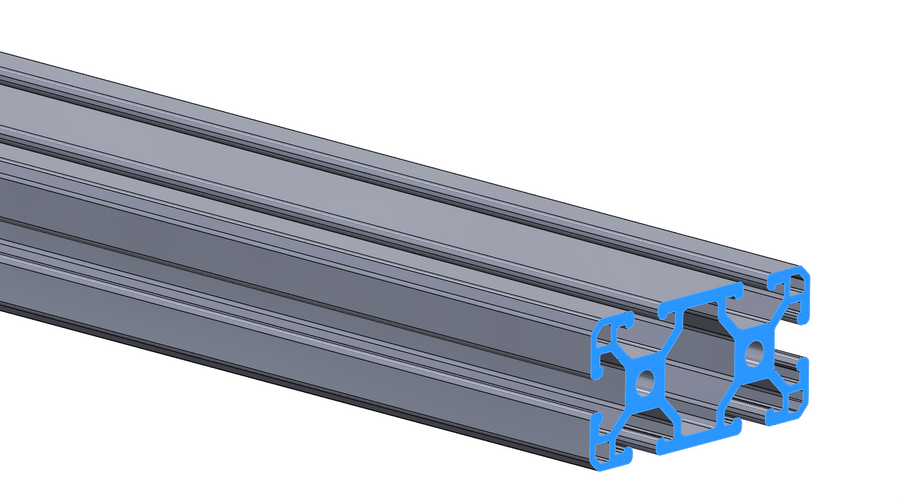
The XTR3 is the newest variant of our rack. It essentially divides the rack into 4 equal quadrants, giving you 4 independently adjustable side braces — so you can mount a rooftop tent, traction boards, and fuel cans on one side while keeping the other open for oversized cargo, pipe, or tools. It comes with 6 uprights, 4 side braces, 3 top crossbars, and 4 top support braces.

Our XTR3 racks are made from the strongest, lightest, and most modular materials on the market — without sacrificing any features. Unlike traditional sheet-metal and tube-steel bed racks, the XTR3 is built from solid aluminum extrusion, which keeps it lightweight while making it dramatically stronger and more rigid — and it won't rust like steel. Best of all, there's a T-slot channel on every linear surface, giving you near-infinite mounting points to attach gear anywhere in any position along the rack, then reconfigure it in minutes as your needs change. With our rack, you'll have as much versatility as your heart can desire — equally at home on an overland adventure or a commercial jobsite.

Choose Your Bed Bracket

The XTR3 mounts to your truck with the bracket that matches your setup. Select the option that fits your tonneau cover:

  • Standard Width — for trucks with no tonneau cover. The classic direct-to-bedrail mount.
  • Wide Width — creates an additional 1.65" of clearance to clear most soft and roll-up tonneau covers. (Tri-fold covers are compatible, but cannot open fully due to the geometry of the rack.)
  • Retrax XR — purpose-built bracket, specifically compatible with Retrax XR tonneau covers. Shop the Retrax XR version →
  • Universal T-Slot Tonneau — running a tonneau cover with a built-in T-slot rail system? Fitment varies by cover, so our customer service team will dial in the right configuration for you. Email [email protected] and we'll take care of it.

Running a soft topper? We also offer a soft-topper-compatible XTR3 rackshop the Soft Topper version here. It's configured with components set at different angles to provide better clearance around the fabric of your soft topper, so the rack sits clean without binding or rubbing the material.

Not sure which bracket you need? Email us at [email protected] and we'll help you confirm fitment.

Why choose the Custom Height XTR3 for your Ford Maverick?

  • Built to your exact height — select your rack height in 1" increments for a perfect fit
  • Solid aluminum extrusion — stronger, more rigid, and far lighter than sheet-metal or steel racks, with no rust
  • T-slot on every surface — near-infinite mounting points to position gear anywhere, then reconfigure in minutes
  • Fully modular — 4 independently adjustable quadrants adapt to any load
  • Overland + utility ready — rooftop tents, awnings, and recovery gear, or ladders, pipe, and jobsite tools
  • No-drill install — bolts to your OEM bed rails and includes all hardware

Our preconfigured bed racks also come in our most popular heights — low, mid, full, and soft-top. Be sure to select the height that works best for your build.

Pictures shown with additional accessories that are sold separately.

XTR3 Bed Rack Includes

  • 3 Top Crossbars
  • 6 Uprights (Columns)
  • 4 Top Support Braces (1530 Black)
  • 4 Side Braces (1530 Black)
  • 6 Bedrail Brackets (connects uprights to bedrail)
  • 4 Top Corner Brackets (connects crossbars and uprights)
  • All screws and hardware required for assembly
  • Set of Black XTR Off-Road Reinforcement Plates ($110 value)
  • Metal Handle Kit – Set of 4 ($40 value)
  • 16 pcs Drop-In T-Nuts – 5/16-8 ($12 value)
  • 16 pcs Button Head Screws – 5/16-8 x 5/8" ($8.80 value)

Rated Capacity (evenly distributed): 450 lbs dynamic off-road, 850 lbs dynamic on-road, and 1,550 lbs static — or OEM bed rail capacity, whichever is less.

Resource Links

Questions, concerns, or requests? Email us: [email protected]

See Terms and Conditions for additional product disclaimers.

Payment & Security

Payment methods

  • American Express
  • Apple Pay
  • Diners Club
  • Discover
  • Google Pay
  • Mastercard
  • PayPal
  • Shop Pay
  • Venmo
  • Visa

Your payment information is processed securely. We do not store credit card details nor have access to your credit card information.